Service Tasks
A Service Task in SpiffWorkflow is an automated task type that interacts with external services or systems. Unlike manual tasks, which require user intervention, Service Tasks are configured to perform specific actions automatically, such as retrieving or updating data, processing information, or calling external APIs.
These tasks are essential for integrating third-party services, streamlining data flows, and automating repetitive actions within a workflow.
Use Cases for Service Tasks
Service Tasks can be used in a wide variety of automation and integration scenarios, such as:
Data Retrieval: Pulling data from external APIs (e.g., employee information from an HR system).
Data Update: Sending data updates to external systems (e.g., updating inventory levels in a warehouse management system).
Notifications and Alerts: Integrating with notification services to automatically alert users when certain conditions are met.
Setting Up a Service Task in SpiffWorkflow
Service Tasks in SpiffWorkflow allow you to configure HTTP requests and other API calls directly within your workflow.
Important Guidelines
Python Expressions: All fields in SpiffWorkflow interpret input as Python expressions. Wrap url in single quotes (
'...') unless passing them as variables.Authentication: For APIs requiring Basic Auth, use
basic_auth_usernameandbasic_auth_passwordparameters.Parameter Syntax: Headers, query parameters, and URLs require JSON-like syntax compatible with Python dictionaries.
Response Variables: Use response variables to store data retrieved from service tasks. These variables can be referenced in later tasks for display or further processing.
Retries for Transient Failures
You can configure retries directly on a service task operator:
<spiffworkflow:retry retries="3" />
retriesis the maximum retry count.backoff_baseis optional (default is3).Retry delay (in seconds) uses exponential backoff (
backoff_base^retry_number, whereretry_numberstarts at1). With defaultbackoff_base=3: first retry after3s, second after9s, third after27s.Retry eligibility is determined automatically by SpiffArena: transient failures (for example network issues, HTTP
5xx, and429) can retry; most other4xxfailures are treated as permanent and fail without retry.
Below, we’ll walk through detailed setup instructions for two examples to illustrate different configurations and use cases.
Example 1: Fetching Mock Data from JSONPlaceholder API
This simpler example demonstrates how to retrieve user data from the JSONPlaceholder API, useful for testing or prototyping workflows.
Service Task Configuration
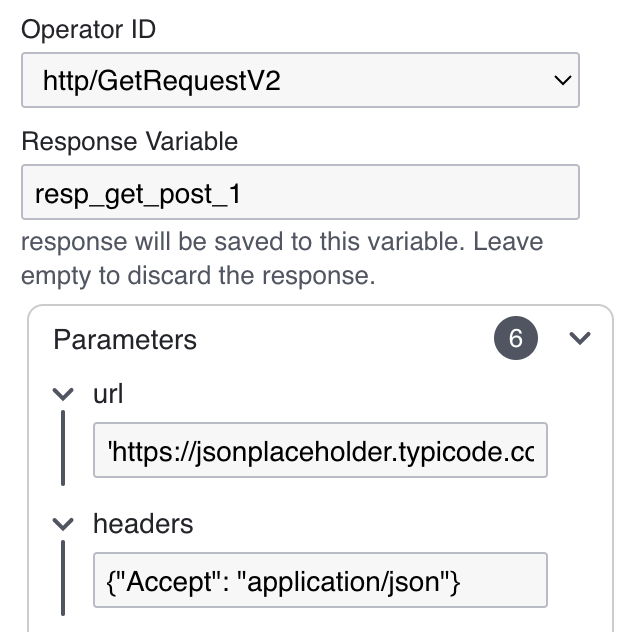
Task Name:
Get User DataOperator ID:
http/GetRequestV2This is a placeholder API endpoint used to retrieve user data.
Response Variable:
resp_get_user_data
This example demonstrates a simple GET request. If you were creating data instead (e.g., using an HTTP POST), you could modify the configuration to use http/PostRequest and change the URL to point to a relevant endpoint.
Parameters:
URL: url:
'https://jsonplaceholder.typicode.com/users/1'The URL is wrapped in single quotes to mark it as a string in Python.
Headers: headers:
{"Accept": "application/json"}The
Acceptheader specifies that the response should be in JSON format.
Example 2: Retrieving Employee Information from BambooHR API
In this example, we’ll configure a Service Task that fetches employee details from the BambooHR API and displays this data in a subsequent manual task.
Below is workflow overview:
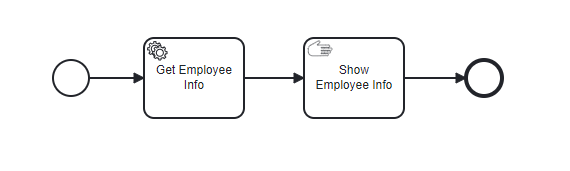
Start Event: Begins the workflow.
Service Task: Retrieves employee information from BambooHR.
Manual Task: Displays the retrieved employee data to the user.
End Event: Completes the workflow.
Service Task Configuration
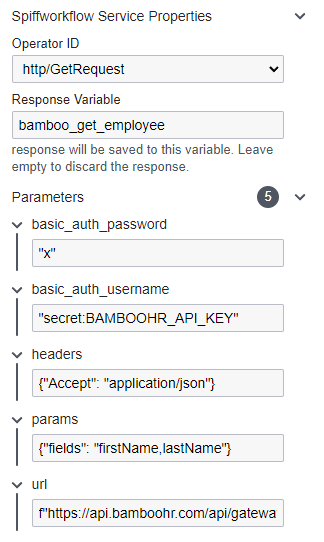
Task Name:
Get Employee InfoOperator ID:
http/GetRequestV2This operator is used for making HTTP GET requests to retrieve data from an external API.
Response Variable:
bamboo_get_employeeThis variable stores the API response, allowing it to be used in subsequent tasks.
Parameters
Basic Authentication:
basic_auth_password:
"x"(enclosed in quotes as its a python expression).basic_auth_username:
"secret:BAMBOOHR_API_KEY"Replace
BAMBOOHR_API_KEYwith your actual API key. This format specifies the username for Basic Auth, using secure handling withsecret:notation.
Headers:
headers:
{"Accept": "application/json"}Specifies that the response should be JSON formatted.
Query Parameters:
params:
{"fields": "firstName,lastName"}Defines specific fields (e.g.,
firstName,lastName) to retrieve from the API.
Note
⚠ This is specific to BambooHR’s API requirements. Other APIs may require different query parameters or none at all.
URL:
url:
'https://api.bamboohr.com/api/gateway.php/{your_company_subdomain}/v1/employees/directory'Replace
{your_company_subdomain}with your BambooHR subdomain.