PyCharm Setup Instructions
This guide provides instructions for setting up PyCharm IDE for SpiffWorkflow backend development.
Pre-Requisites
Before starting, ensure you can run
bin/run_server_locallyscript successfully. This will prove that your libraries are properly configured.Checkout a git repository with sample process models such as our Sample Process Models
Step 1 - Python Interpreter
In the settings, ensure that you have configured your Python interpreter to use the poetry environment you have created.
Step 2 - Configuration Settings
Create a config.py file in the src/instance directory, with the following base settings
FLASK_SESSION_SECRET_KEY="[PUT SOME RANDOM STUFF HERE]"
SPIFFWORKFLOW_BACKEND_APPLICATION_ROOT="/"
SPIFFWORKFLOW_BACKEND_BPMN_SPEC_ABSOLUTE_DIR="[FULL PATH TO SAMPLE PROCESS MODEL GIT CLONE]"

# This will configure your application to use a built in login rather than
# relying on keycloak etc...
SPIFFWORKFLOW_BACKEND_AUTH_CONFIGS = [
    {
    "identifier":"default",
    "label":"internal openid",
    "uri":"http://localhost:7000/openid",
    "client_id":"spiffworkflow-backend",
    "client_secret":"JXeQExm0JhQPLumgHtIIqf52bDalHz0q"
    }
]

# You can modify the permissions by creating your own permissions file and setting it here.
# See example.yml in the src/spiffworkflow_backend/config/permissions directory
SPIFFWORKFLOW_BACKEND_PERMISSIONS_FILE_NAME="example.yml"
Check the default.py config file in src/spiffworkflow_backend/config directory for more options you can specify as needed.
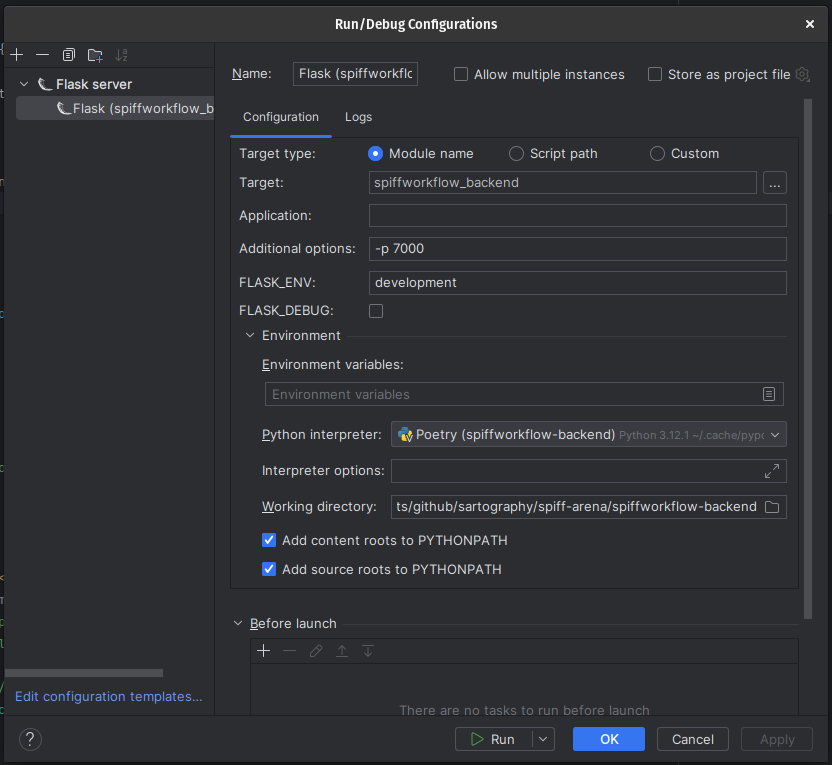
Step 3 - Run Configuration
Configure your Run configuration with the following settings:
Select Flask Server as the run type
Set the target to: spiffworkflow_backend
Set the port to 7000 (-p 7000)
See the screenshot below for reference:
Step 4 - Code Formatting
We are using Black for code formatting. To avoid the madness of having Black enforce one style, and your editor enforcing another, follow the directions outlined here.
Start the application using the play / debug buttons.
IMPORTANT
Before committing changes to the repository, be sure to execute the
run_pylcommand in the top level spiff-arena directory and fix any issues it reports.When doing so, be sure to have the poetry environment AT THAT TOP LEVEL activated NOT the one in the backend. Otherwise, you will get invalid information.